
TeXmacs Upsilon
TeXmacs Upsilon is an enhanced and bleeding-edge version of GNU TeXmacs with experimental features: OpenType mathematics, new interfaces, faster Scheme interpreters, Git, Zotero and citation styles, program code with tree-sitter and language servers, AI sessions, and more (what it adds, also in pictures, and the recent changes). Below are its latest builds, made by the continuous integration of the repository at each change: they are tested, but they are not releases. Problems go to the issues of the repository, not to the official TeXmacs.
Only the bug fixes, on the stock TeXmacs, without the rest: TeXmacs Fixes, the conservative version.
In the browser
Loading the list of the files…
The desktop applications keep their preferences and the
files of the user in a folder of their own, ~/.TeXmacs_Upsilon
(on Windows %APPDATA%\TeXmacs_Upsilon), not in the
~/.TeXmacs of the official TeXmacs, which they leave alone. To
use your own files of ~/.TeXmacs (progs,
styles, packages, plugins…)
with TeXmacs Upsilon too, copy them into the same places of
~/.TeXmacs_Upsilon.
Sources
The sources are the branch
upsilon_texmacs
of github.com/mgubi/texmacs:
the SVN trunk of TeXmacs with the additions below merged in. Each addition
is also kept as a branch of its own, so that it can be proposed upstream
separately. To build it:
git clone -b upsilon_texmacs https://github.com/mgubi/texmacs.git
cd texmacs/src
./configure --with-gui=qt --with-scheme=s7
make
The interface is chosen with --with-gui=qt|cocoa|vue|…
and the Scheme with --with-scheme=s7|femtolisp|guile; the
README
describes each option and what each one needs.
What it adds
Inside TeXmacs, Help > Upsilon features gives a tour of all this, with the menus to use and links to the manual. Some of it is shown in pictures.
Fixes and speed
- Many bug fixes not yet upstream, for bugs reported on Savannah and on GitHub: the Scheme bridge, LaTeX import and export, BibTeX, list views, editing modes, keyboard maps, Windows paths, and more.
- Incremental typesetting: only the parts of a document that change are typeset again, so typing in long documents is faster. Styles and files are cached until they change on disk.
Fonts and mathematics
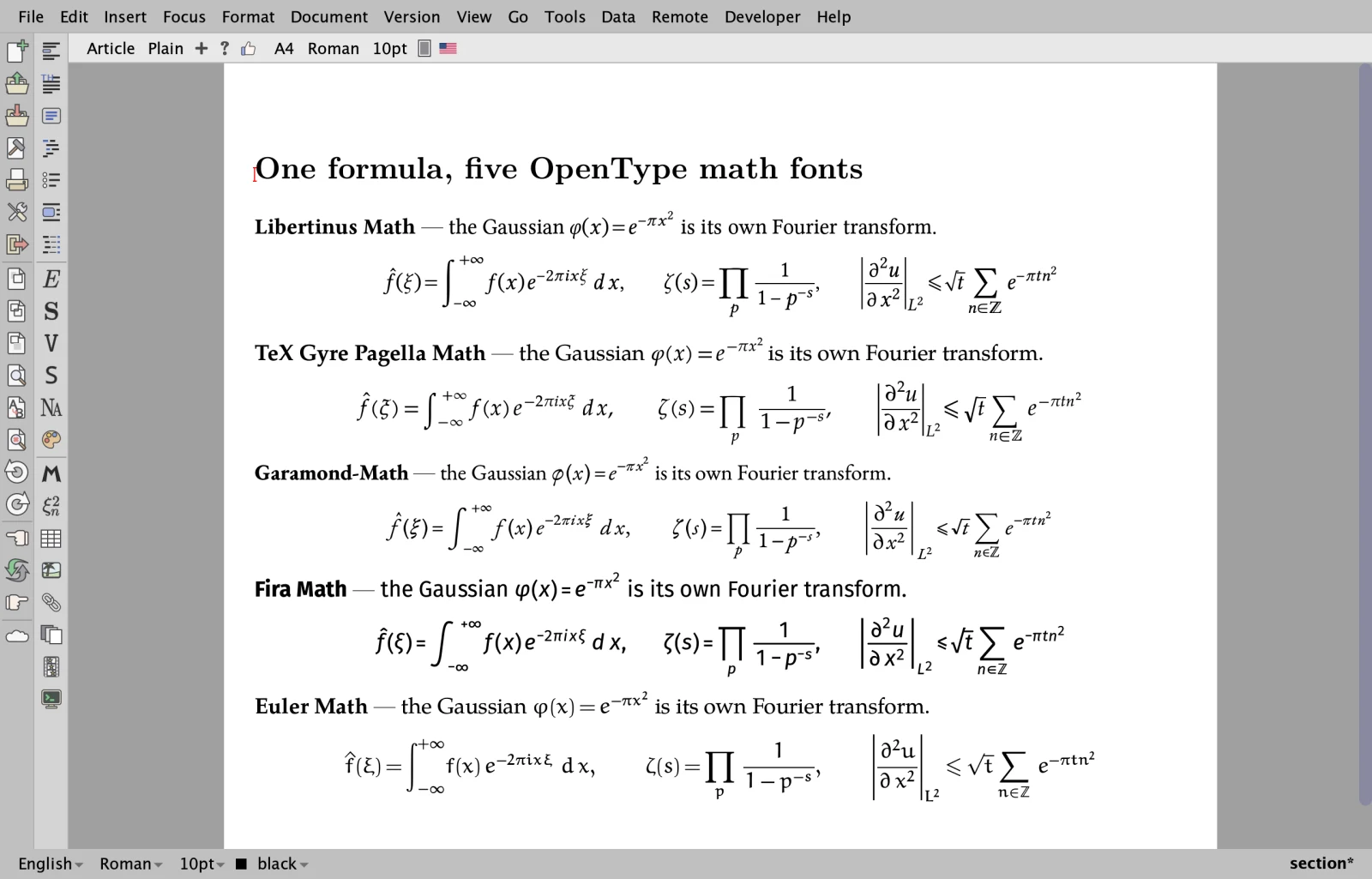
- OpenType mathematics: formulas laid out from the
MATHtable of any OpenType math font, with the stretchy delimiters and accents of the font. Text fonts get their OpenType features, and families their weights and variants (Format > Weight). - About two dozen math fonts paired with matching text fonts, most of them shipped, and a font inspector.
- More fonts: DejaVu, Gentium Plus, the Antykwas, Iwona, Kurier, the weights of IBM Plex…
- A font design page: a tab for each part of a document (text, mathematics, sans serif, typewriter, blackboard bold, calligraphic, fraktur) with samples; a choice can be applied to the document and saved under a name.
Interfaces
- Besides Qt, a native Cocoa interface for macOS, and Vue, an interface drawn entirely by TeXmacs. Both draw on the GPU (Metal on macOS, OpenGL elsewhere), with MuPDF as a fallback.
- Light and dark themes, icon bars at the left or at the top, responsive tabs and smooth zoom.
- New icon sets: neo-classical (the default), monochrome and Lucide.
Scheme interpreters
- s7 replaces Guile 1.8 by default: nothing to install, and a much faster start (the first window in about 0.7 s instead of 1.9 s).
- An experimental femtolisp backend: a small Scheme that works directly on the byte strings of TeXmacs and caches its compiled files. It starts about as fast as s7, is faster on conversions such as the LaTeX export, and works on the desktop and in the browser.
- Guile is still a build option; the same Scheme code serves all three.
Documents and references
- Git (Version > Git): a side panel, commits, the history, branches, tags, stashes, push, pull and clone, the comparison with any revision, and three-way merges of TeXmacs documents that follow their structure, also as a merge driver of git.
- Zotero citations, read live from the Zotero application: search, completion of keys, bibliography files kept in sync with Zotero, and group libraries.
- CSL bibliography styles (those of Zotero, Mendeley and Pandoc),
processed by TeXmacs itself:
csl-apa,csl-ieee,csl-chicago-…, and any.cslfile placed next to the document. - New converters: Markdown, and Word and OpenDocument
(
.docx,.odt), for import and export.
Program code
- The syntax of 22 languages by tree-sitter, in source files, in the code blocks of documents and in the inputs of sessions: colours, folds, an outline, selection and moves by structure, brackets, indentation and comments.
- A language server (LSP) client for source files, which open in tabs of their own: diagnostics, completion, hover, signatures, references, renaming, quick fixes, formatting and symbols. The code blocks of a document in the same language are one file for their server, so the definitions of a block are known in the next.
AI sessions
- Chats inside a document with ChatGPT, Claude, Gemini, Mistral, Ollama, OpenRouter and Albert: streamed answers, files attached to the questions, the costs shown, and the keys kept in an encrypted wallet.
Documentation and tests
- Developer documentation inside TeXmacs (Help > Developer documentation): about 400 pages, some 250 of them on the internals of the source code.
- Many new tests: C++ unit tests, nearly sixty Scheme regression suites, document regressions and a headless typesetting of the whole manual, run by the continuous integration on every platform.
In the browser
- The same sources compiled to WebAssembly: TeXmacs in a web page, with editing and typesetting, all the menus and dialogs, documents stored in the browser, PDF export, the clipboard and spell checking.
- Plug-ins that run inside the page: Python (Pyodide), R (webR), TikZ (TikZJax), Asymptote, JavaScript and the AI sessions.
- Drawn by WebGPU in Chromium-based browsers and by WebGL2 elsewhere;
?gpu=0at the end of the address draws with MuPDF instead. Help > TeXmacs in the browser lists what does not work yet (what needs to run a program on your computer, such as language servers or Git) and the recent changes.
This is work in progress: keep backups of your important documents, and expect rough edges, especially in the Cocoa and Vue interfaces, with femtolisp, and in the browser.
Reporting a problem
Crashes, documents typeset differently from the official TeXmacs, something missing in one of the interfaces, something confusing: all reports help. They go to the issues of the repository (a GitHub account is needed), not to the bug tracker of the official TeXmacs, which does not have these changes.
Before writing
- Search the open and closed issues: the problem may be known, or fixed in a newer build. If it is there, add what you know to that issue.
- If you can, try the latest build: the files above are replaced at each change of the sources.
- If you have the official TeXmacs too, check whether the problem happens there as well, and say so: it tells whether it comes from the changes of Upsilon.
What to write
- The build: the name of the file you downloaded and the commit shown under its download button (or the day you downloaded it), your system and its version (for example macOS 15.3 on Apple silicon, Ubuntu 24.04, Windows 11). In the browser: the browser and its version, and the commit shown in Help > TeXmacs in the browser.
- The steps that lead to the problem, from the start of TeXmacs or from opening a document, one action at a time: the menus, the keys, what you typed.
- What happens, and what you expected instead. For what is drawn wrong, add a screenshot.
- A document when the problem depends on one: the
smallest
.tmfile that shows it. GitHub does not take.tmattachments: put the file in a.zip, or rename it to.txt. - The messages of TeXmacs, if any (see below).
One problem per issue, please: they are then fixed and closed one by one.
Getting the messages
- The debugging console of TeXmacs collects its errors and warnings: in the preferences, tab Debug, Open debug console (the same tab can open it by itself on errors).
- On macOS and Linux, starting TeXmacs from a terminal shows its
messages there, and the last ones before a crash: on macOS
"/Applications/TeXmacs Upsilon.app/Contents/MacOS/TeXmacs"(orTeXmacs Upsilon Vue.app), on Linux the command given above. - After a crash on macOS, the window of macOS about it has a button Report…: copy the text of the report into the issue.
- In the browser, the console of the browser (F12, or Option-Command-J in Chrome on macOS) shows the messages of the page.
Check what you paste: remove the API keys of the AI sessions, passwords, and the private parts of your documents and paths.